6 Best Keyboard for Acrylic Nails for Typing Comfort
For most buyers, the best keyboard for acrylic nails is the Silicone Keyboard Cover for MacBook Pro/Air, a thin silicone layer that makes typing easier with longer tips. Its main advantage is full key coverage in a low-profile design, which can reduce snags while helping shield the built-in keyboard from dust and small spills. It is a practical add-on, not a separate typing device.
This guide is for anyone who wants more comfortable typing with long, pointed, or square acrylics. The key factors are accurate fit, full coverage, silicone thickness, and clear legends that remain easy to read. A loose cover can shift, while a thick one may make key presses feel less responsive. The six picks below are ranked by their design and everyday usefulness, with clear reasons and honest drawbacks for each. That makes it easier to choose a cover that matches your laptop and typing habits.
Quick Comparison
| # | Product | Best For | Price | |
|---|---|---|---|---|
| 1 | Silicone Keyboard Cover for MacBook Pro/Air | MacBook owners needing spill protection | ~$8 | View → |
| 2 | Quafochi Long Nail Keyboard Bubbles | Long nails needing extra typing room | ~$10 | View → |
| 3 | Wireless Keyboard and Mouse Combo, Typewriter Style | Retro-style home office setups | ~$38 | View → |
| 4 | Keyboard Cover Stickers, 110-Piece Set | Full keyboard relabeling projects | ~$12 | View → |
| 5 | Raised Keyboard Stickers | Tactile key identification for low vision | ~$8 | View → |
| 6 | Quafochi Long Nail Keyboard Stickers | Decorative long-nail keyboard personalization | ~$12 | View → |
6 Keyboards That Work With Acrylic Nails
The list is ranked from six to one, with the top keyboard saved for last.
6. Quafochi Long Nail Keyboard Stickers

Best for: People with long, polished nails
Quafochi’s set adds raised, clear glass stickers to keyboard keys. The extra height gives long nails more room, so fingers can contact the keys without striking nail tips as often. Each bubble has a heart-shaped design and a smooth surface, while the letters remain visible underneath. That makes this accessory useful for office typing, messaging, and casual gaming.
The package includes 80 keyboard stickers, 90 transparent adhesive tabs, a removal stick, and an instruction card. Everything fits inside a reusable storage box, which helps keep spare pieces organized. The tabs are designed to hold the stickers steady, yet they can be removed without leaving residue. At around $12, the set costs less than replacing damaged nail art, though results may vary with keyboard surfaces and cleaning habits. These pieces suit desktop and external keyboards best. Laptop owners need a removable keyboard cover, not included, and must lift it off before closing the computer.
Pros
- Raises key surfaces so long nails can type with fingertips instead of nail edges.
- Includes 80 clear stickers and 90 adhesive tabs for replacements or repositioning.
- Reusable storage box keeps the removal tool, instructions, and extras together.
Cons
- Not suitable for closing a laptop directly, since the added height can interfere with the screen.
- Heart-shaped pieces may not match every keyboard layout or key size, so some keys may require careful placement.
5. Raised Keyboard Stickers

Best for: Long acrylic nail keyboard users
These 80 raised keyboard stickers add a small, curved surface above each key. Each clear glass cap measures 0.63 by 0.315 inches, so it creates extra clearance for acrylic, gel, or naturally long nails. The set fits most laptop and desktop keyboards, plus many calculators. At around $8, it is a low-cost way to adjust a keyboard without replacing keycaps.
The kitty-shaped design adds some personality, while the transparent glass keeps the original key labels visible. Compared with silicone covers, the glass material should resist scratches better, avoid odor, and stay clear without yellowing. Each piece uses acrylic double-sided tape. The adhesive is intended to stay in place during work or gaming, then come off without residue. Installation still takes patience because every cap must be aligned by hand. The curved surface can also change how letters look from certain viewing angles, which may bother users who want a perfectly unchanged display.
Pros
- Includes 80 caps, enough for most full-size keyboards with extras.
- Raised glass surfaces provide more room for long nails.
- Clear, odor-free material resists scratches and yellowing better than silicone.
Cons
- Applying 80 individual stickers can take considerable time and careful alignment.
- Curved caps may make key letters look distorted from some angles.
4. Keyboard Cover Stickers, 110-Piece Set

Best for: People with long, polished nails
This set includes 110 raised, clear glass stickers for keyboard keys. Each bubble gives your fingertip a higher contact point, so you can press keys without striking them with your nails. The transparent material lets printed letters remain visible and may make small characters easier to read. At around $12, the package offers enough pieces for many standard keyboards, laptops, MacBooks, desktops, and calculators. The stickers are designed to fit individual keycaps rather than cover the whole keyboard.
Application is simple, but it takes patience. Place the included adhesive tape on each glass piece, remove the backing, and press it onto the key. The curved shape supports a fingertip-based typing position, which may help protect nail art and reduce tapping noise. Strong adhesive is intended to keep the bubbles in place during regular typing or gaming. View them from a normal seated position for the clearest characters. From a steeper side angle, the raised glass can slightly change visibility.
Pros
- 110 pieces can cover several keyboards or replace lost stickers.
- Raised glass lets long nails type with fingertips instead.
- Clear construction keeps key letters visible and may enlarge them.
Cons
- Applying 110 small stickers individually can take considerable time.
- Curved bubbles may be harder to read from side angles or unusual seating positions.
3. Wireless Keyboard and Mouse Combo, Typewriter Style
Best for: Long-nail users wanting a cute workspace
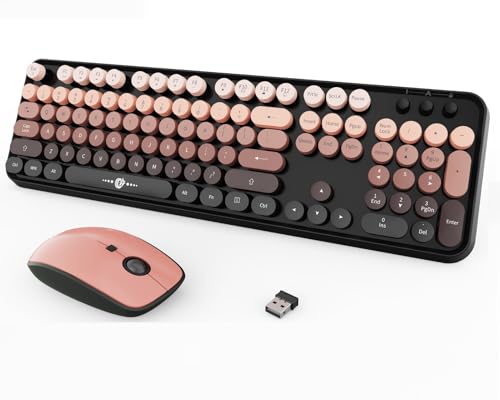
This wireless keyboard and mouse set pairs a full-size, typewriter-inspired keyboard with a matching ergonomic mouse. The keyboard includes a numeric keypad and function shortcuts, making it practical for spreadsheets, schoolwork, and office tasks. Its raised, round bubble keys have extra spacing for long, acrylic, and press-on nails. The black-and-pink gradient gives it a playful retro look without taking up the usual cord space.
Typing should feel soft and lightly tactile, with a gentle sound from the rounded keycaps. The mouse offers three DPI settings, 800, 1200, and 1600, so users can adjust pointer speed for browsing or detailed work. Both devices connect through a compact 2.4GHz USB receiver with plug-and-play setup. Compatibility includes Windows PCs, laptops, desktops, Chromebooks, and other USB-supported devices. Around $38, it costs more than basic office combos, but the long-nail-friendly design and matching aesthetic make it more distinctive.
Pros
- Extra-spaced, raised keys can reduce accidental presses with long or acrylic nails.
- Full-size layout includes a useful numeric keypad and shortcut keys.
- Adjustable 800, 1200, and 1600 DPI settings suit different pointer-control needs.
Cons
- Round keycaps may take time to adjust to if you prefer flat laptop-style keys.
- The USB receiver uses a standard USB connection, which may require an adapter for some newer devices.
2. Quafochi Long Nail Keyboard Bubbles

Best for: Long acrylic nail typists
Quafochi’s set adds raised, heart-shaped bubbles to keyboard keys, giving long nails more clearance. The elevated surface lets fingers contact the key instead of striking it with the nail, which may help protect polish, acrylics, and natural nails during daily typing. The clear design keeps the key letters visible, while the smooth top provides a broader target for finger pads. The set costs around $10, though prices can change.
The package includes 65 clear stickers, 80 adhesive tabs, a removal tool, an instruction card, and a reusable storage box. That count covers roughly the 60 keys many people use most, rather than filling a box with extras for rarely pressed keys. The tabs are designed to hold the bubbles in place, then remove without residue when you need to reposition them. They suit desktop and external keyboards best. Laptop owners need a removable keyboard cover, not included, so the computer can still close. People with very long acrylics may also need taller bubbles for enough clearance.
Pros
- Raised surfaces reduce direct nail contact with keys.
- Clear hearts keep letters visible while adding a cute detail.
- Includes 65 stickers, 80 tabs, a tool, and storage box.
Cons
- Laptop use requires a separate removable keyboard cover.
- The standard profile may not provide enough height for extra-long acrylic nails.
1. Silicone Keyboard Cover for MacBook Pro/Air

Best for: MacBook users with long nails
This keyboard cover is a thin silicone skin made for people with acrylic, gel, or naturally long nails. Its raised 3D key shapes create more room between each fingertip and the laptop surface, which can make typing more comfortable. The cover is listed for MacBook Pro and MacBook Air models from 13 to 16 inches, including many 2020-2025 versions. It also fits over the keyboard without glue or tools.
The soft silicone helps shield keys from dust, crumbs, stains, and small spills. You can remove it, rinse it, and reuse it when the surface gets dirty. Its flexible construction may also reduce typing noise, though it will not feel exactly like bare keys. The transparent pink design keeps the keyboard lettering visible while adding color. At around $8, it offers an inexpensive way to protect a MacBook keyboard, especially for users who often catch their nails on standard key surfaces. Check your exact laptop layout before ordering, since MacBook keyboards vary by model and region.
Pros
- Raised silicone keys give long nails more clearance while typing.
- Washable material helps guard against crumbs, dust, stains, and minor spills.
- Tool-free placement works with MacBook Pro and Air keyboards from 13 to 16 inches.
Cons
- It may slightly change key feel and reduce typing precision for fast typists or gamers.
- Compatibility is not universal, so the exact MacBook model and keyboard layout must match.
Buying Guide
The most important factor is key spacing and profile. Wider gaps and low-profile keycaps give long nails room to land without catching neighboring keys or forcing awkward wrist angles. Look for 18 to 19 mm key pitch, low-profile switches, and a full-size layout only if you need a number pad.
- Key spacing: Choose 18–19 mm center-to-center spacing and keycaps with clear edges. Avoid tightly packed 60% boards if missed keys frustrate you.
- Switch feel: Pick light linear or tactile switches rated around 35–50 grams. Heavy 60-gram springs can require more force and make long typing sessions tiring.
- Keyboard height: Aim for a front edge under 25 mm, or add a wrist rest at least 65 mm deep. Lower keys reduce contact with nail tips.
- Layout and shortcuts: A 75% or tenkeyless board saves desk space while keeping arrow keys and function rows. Confirm shortcut access for your operating system.
- Connection and price: Wired models often cost $30–$80. For wireless use, seek 40 hours or more of battery life and Bluetooth plus a 2.4 GHz receiver.
If you cannot have everything, prioritize key spacing, since accurate, comfortable keystrokes matter more than lighting or extra controls.
Frequently Asked Questions
How do I choose a keyboard for acrylic nails?
Choose a keyboard for acrylic nails with low-profile, widely spaced keys and a compact layout. These features give longer tips more room and reduce accidental presses. Look for key spacing near 19 mm, slim keycaps, and a gentle typing angle. A wireless model can also keep the desk clear.
What keyboard features make typing easier with long nails?
Low-profile keycaps, moderate spacing, and light actuation make typing easier with long nails. A full-size board typically has about 104 keys, but a tenkeyless model leaves more mouse space without removing the arrow cluster. Avoid tall, tightly packed keys if nail tips often strike neighboring buttons.
Can a mechanical keyboard work with acrylic nails?
Yes, a mechanical keyboard can work well with acrylic nails if it uses low-profile switches and keycaps. Clicky switches may sound sharp in shared spaces, while linear or tactile options often feel quieter. A 75% layout keeps the function row and arrows in roughly 80 keys, saving desk space.
Are wireless keyboards good for acrylic nails?
Yes, wireless keyboards are good for acrylic nails when their keys are flat, separated, and easy to see. Wireless connectivity does not change key comfort, so focus on the layout first. Many compact models measure about 11 to 14 inches wide, leaving room for a wrist rest or phone.
Conclusion
Silicone Keyboard Cover for MacBook Pro/Air remains the top pick for anyone who wants softer key presses, fewer crumbs, and a snug cover for a compatible Apple laptop. If your priority is a full external keyboard with more room around each key, choose a low-profile model instead, since its wider layout can feel easier to use with long acrylics. Before buying, double-check the cover or keyboard size, your exact MacBook compatibility, the quantity included, and the current price. A thin silicone layer can also help protect against dust, but it may slightly reduce key feedback. Choose the option that fits your device first, then weigh comfort, cleaning, and daily desk space.