
5 Best Laptop Wall Mount for Small Desks
The MOUNT PRO 2-in-1 Laptop and Monitor Wall Mount is the top pick for most buyers. It earns the title of best laptop wall mount because its two-in-one design can hold a laptop and monitor without needing separate mounts. That makes it practical for desks with limited space, though buyers should confirm compatibility before ordering.
This guide is for remote workers, students, and anyone clearing a crowded desk. The key checks are tray size, load capacity, VESA support for the monitor, and the wall material and hardware included. A mount that fits the computer but not the wall is not a good value. The five picks below are ranked with clear reasons and honest drawbacks for each, so you can compare stability, adjustability, and installation effort before choosing one.
Quick Comparison
| # | Product | Best For | Price | |
|---|---|---|---|---|
| 1 | MOUNT PRO 2-in-1 Laptop and Monitor Wall Mount | Dual-Screen Home Office Setups | ~$48 | View → |
| 2 | ErgoFocus Laptop Wall Mount Monitor | Space-Saving Laptop Workstations | ~$30 | View → |
| 3 | WALI Laptop Wall Mount | Budget-Friendly Wall-Mounted Laptops | ~$38 | View → |
| 4 | PUTORSEN 2-in-1 Monitor and Laptop Wall Mount | Adjustable Monitor-Laptop Arrangements | ~$70 | View → |
| 5 | PUTORSEN 2-in-1 Laptop Wall Mount | Compact Desk-Free Workspaces | ~$33 | View → |
5 Top Laptop Wall Mounts
These five wall-mounted laptop holders are ranked from fifth to first, so the top pick comes last.
5. PUTORSEN 2-in-1 Laptop Wall Mount

Best for: Small desks with wall-mounted displays
The PUTORSEN 2-in-1 wall mount holds either a 10- to 17-inch laptop or a screen up to 32 inches. It supports devices from 4.4 to 19.8 pounds and uses standard 75×75 or 100×100 mm VESA patterns for compatible monitors. At around $33, it offers a practical way to move a display off the desk without buying a separate laptop stand and monitor arm.
Its 17.6-inch extension gives you useful reach, while ±180-degree rotation and tilt from 85 degrees upward to 20 degrees downward help set a comfortable viewing angle. The laptop tray includes non-slip padding and ventilation openings, which protect the surface and allow more airflow around the computer. Cable routing keeps wires closer to the arm instead of spread across the workspace. Installation hardware and instructions are included, but monitor screws are not, so screen mounting may require a separate screw set.
Pros
- Supports both 10- to 17-inch laptops and VESA monitors up to 32 inches.
- Wide rotation, tilt, and 17.6-inch reach suit changing work positions.
- Padded, ventilated tray protects laptops while allowing airflow.
Cons
- The laptop tray may not fit unusually thick laptops or oversized gaming models.
- Monitor mounting screws are not included, so compatible hardware may need to be purchased separately.
4. PUTORSEN 2-in-1 Monitor and Laptop Wall Mount

Best for: Small desks with two screens
The PUTORSEN wall mount combines two adjustable arms with a removable laptop tray. Use it with two monitors, or pair one screen with a laptop up to 18 inches. The arms support monitors up to 32 inches and 19.8 pounds, while the tray holds laptops up to 11.02 pounds. VESA 75x75mm and 100x100mm patterns are supported.
Each arm extends from 3.85 to 20.88 inches, with ±90-degree swivel, ±45-degree tilt, and 360-degree screen rotation. That range makes it easier to position displays at different heights or pull them closer when needed. The laptop tray has sliding clamps that can leave side ports open, plus a lower traction tab to help keep the computer in place. Around $70, it costs more than a basic single-screen wall bracket, but offers more layout options. Installation requires a wood stud, concrete, or brick wall. It is not suitable for drywall without proper structural support.
Pros
- Supports two monitors or one monitor plus a laptop.
- Long arm extension provides 20.88 inches of reach.
- Adjustable tray helps avoid blocking laptop ports.
Cons
- Requires a suitable wall structure, not drywall alone.
- The laptop tray supports 11.02 pounds, limiting heavier laptops.
3. WALI Laptop Wall Mount
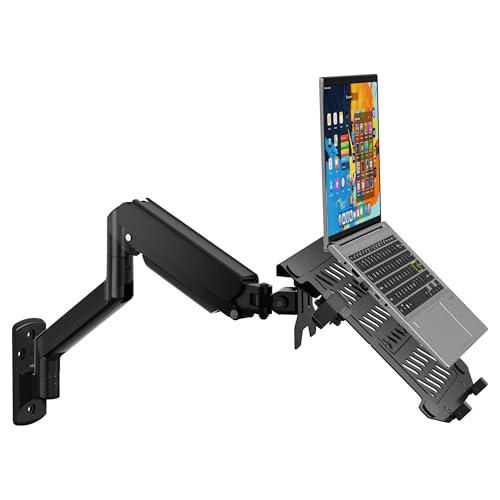
Best for: Compact home office workstations
The WALI wall mount holds either a 10–17-inch laptop or a 17–32-inch monitor. It supports laptops up to 15.4 pounds and screens up to 22 pounds, with VESA 75x75mm and 100x100mm patterns. The platform mounts to the wall instead of taking up desk space, which suits dorm rooms, small offices, and shared work areas. It costs around $38, though prices can change.
Its strongest feature is the wide range of adjustment. The arm extends from 16.7 to 19.3 inches, tilts from 70 degrees upward to 45 degrees downward, swivels 90 degrees in either direction, and rotates 360 degrees. That range helps position a display for typing, calls, gaming, or presentations. The laptop tray has ventilation holes to improve airflow during heavier workloads. Still, this is a wall-mounted accessory, so installation quality and wall strength matter. A suitable mounting surface is essential for heavier screens.
Pros
- Supports both laptops and monitors, giving one mount two uses.
- Wide tilt, swivel, and rotation range helps improve viewing posture.
- Ventilated laptop platform allows more airflow around the device.
Cons
- Requires careful wall installation and a suitable mounting surface.
- Laptop support tops out at 17 inches and 15.4 pounds, limiting larger models.
2. ErgoFocus Laptop Wall Mount Monitor

Best for: Small home offices with limited desk space
The ErgoFocus Laptop Wall Mount is a space-saving wall bracket that works in two modes. Its vented tray holds most 11- to 17-inch laptops weighing 4.4 to 22 pounds. The included VESA plate converts it into a monitor arm for 22- to 32-inch displays with 75×75 mm or 100×100 mm mounting patterns. At around $30, it offers more flexibility than a basic laptop shelf.
Positioning options are generous. The arm tilts 70° upward and 45° downward, swivels 180°, and rotates 360° in monitor mode. It also provides 11 inches of vertical adjustment and reaches 20.7 inches from the wall. The tray uses adjustable clamps and a locking mechanism to hold a laptop in place. Ventilation slots leave space beneath the device for airflow. It may free much of the desk surface, but installation needs care. Use wood studs, cement, or concrete brick. Drywall alone is not suitable.
Pros
- Supports laptops from 11 to 17 inches and up to 22 pounds.
- Converts to a monitor arm for 22- to 32-inch VESA displays.
- Tilt, swivel, rotation, and height adjustments improve viewing flexibility.
Cons
- Drywall-only installation is unsafe, so renters may need permission or another mounting plan.
- The arm extends 20.7 inches from the wall, which can take up space in front of the desk.
1. MOUNT PRO 2-in-1 Laptop and Monitor Wall Mount

Best for: Small desks needing flexible laptop support
The MOUNT PRO is a wall-mounted arm that holds either a laptop or computer monitor. Its vented tray fits most 11–17-inch notebooks and supports devices from 4.4 to 19.8 pounds. Swap in the included VESA plate for a 13–32-inch monitor with a 75 x 75 mm or 100 x 100 mm mounting pattern. The gas-spring arm provides 11.8 inches of height adjustment, which suits sitting or standing work areas.
Its movement range is useful in tight rooms. You can tilt the arm from +90 to -45 degrees and swivel it 180 degrees. Monitors can also rotate 360 degrees. The aluminum-and-steel build includes cable routing, while the tray’s adjustable straps help hold a laptop in place. Ventilation slots allow airflow beneath the computer. Setup requires a wood stud, cement wall, or concrete block. Drywall alone is not suitable, so installation may take more planning than a desk stand.
Pros
- Holds laptops or monitors, giving one arm two setup options.
- 11.8 inches of height adjustment supports seated and standing work.
- Vented tray, straps, and cable routing help organize a laptop workspace.
Cons
- It should not be installed in drywall alone, which limits placement.
- The 19.8-pound capacity does not guarantee compatibility with every large monitor, so check the screen’s weight and VESA pattern first.
Buying Guide
The most important factor is compatibility with your laptop and wall. A secure laptop wall holder must support the computer’s weight, fit its base, and attach safely to drywall, studs, or masonry.
- Weight capacity: Choose a mount rated at least 5 pounds above your laptop’s weight. A 6-pound computer needs a mount rated for 11 pounds or more.
- Tray size and grip: Measure the laptop’s width and depth, then compare them with the tray range. Adjustable lips or side clamps should hold computers from about 11 to 17 inches without covering ports.
- Wall attachment: For drywall, select a model that mounts into a stud or includes toggle bolts rated for its full load. Masonry walls require suitable anchors, not standard drywall screws.
- Adjustment range: Look for at least 90 degrees of tilt and 180 degrees of swivel. An arm extending 10 to 16 inches can improve viewing distance and desk clearance.
- Ventilation and cables: Use a perforated or open tray that leaves the laptop’s underside vents clear. Allow at least 1 inch around exhaust areas, and check for cable clips or a 2-inch cable opening.
If you cannot satisfy every requirement, prioritize secure weight support and correct wall anchoring.
Frequently Asked Questions
How do I choose a laptop wall mount?
Choose a laptop wall mount by checking your computer’s weight, screen size, mounting surface, and the holder’s adjustment range. For example, a 15-inch laptop may need a tray wider than 14 inches, plus a weight rating above the computer’s listed mass. Confirm the wall material and keep ports, vents, and the keyboard accessible after installation.
What features should I look for in a laptop wall holder?
Look for a ventilated tray, a secure retaining lip, tilt adjustment, and hardware suited to your wall type. A tray with several inches of width adjustment can fit different computers, while a 10- to 15-degree tilt range may improve viewing. Cable openings can reduce strain on charging cords, but they do not replace proper support.
Can I mount a laptop directly to a wall?
Yes, you can mount many laptops to a wall, provided the bracket supports the computer’s weight and attaches to a suitable structural point. Drywall usually needs a stud or correctly rated anchors, while masonry requires compatible screws and plugs. Keep the mount away from heat sources, and leave ventilation space around the laptop.
Are wall-mounted laptop holders good for saving desk space?
Wall-mounted laptop holders are useful for saving desk space, but they are not ideal for every setup. They work well for fixed workstations, media controls, and small rooms, while frequent repositioning may favor a desk stand. Check the viewing height, chair position, and access to power before drilling.
Conclusion
MOUNT PRO 2-in-1 Laptop and Monitor Wall Mount is the top pick for desk users who want one adjustable arm for a laptop and an external screen. If your priority is a lower-cost setup for a single laptop, choose a simpler laptop-only wall bracket instead, since it usually takes up less space and costs less. Before ordering, double-check your laptop’s size and weight, the mount’s VESA and clamp compatibility, the number of devices included, and the current price, since listings and bundles can change. A wall-mounted setup can free valuable desk space, but only when the wall, screws, and mounting surface can support the loaded arm. Keep cables long enough to reach ports without sharp bends.